Architecture
How Yak works under the hood. This page exists for the person who wants to understand the system before trusting it — or for someone debugging unexpected behavior who needs a mental model.
Three workflows, one substrate
Section titled “Three workflows, one substrate”Yak is an autonomous coding agent for papercuts, a line-by-line PR reviewer, and a per-branch preview server. One shared sandbox fleet powers all three workflows.
┌────────────────────────────────────────────┐ │ Workflows (surfaces) │ │ │ │ Coding Agent PR Review Branch │ │ (papercuts) (line-level Deployments │ │ comments) │ └────────────────────────────────────────────┘ │ ┌────────────────────────────────────────────┐ │ Substrate (shared) │ │ │ │ Repos ⟷ GitHub App ⟷ Ingress ⟷ Auth │ │ Sandboxes (Incus + ZFS CoW + per-repo │ │ templates from SetupYakJob) │ │ Jobs / Queues / Scheduler │ │ Dashboard / Artifacts / Logs / Costs │ └────────────────────────────────────────────┘The substrate is the load-bearing part. Workflows are the user-facing surfaces. New workflows in the future plug into the same substrate without reshaping the base.
Coding Agent Workflow
Section titled “Coding Agent Workflow”Every fix task goes through the same pipeline, regardless of where it came from:
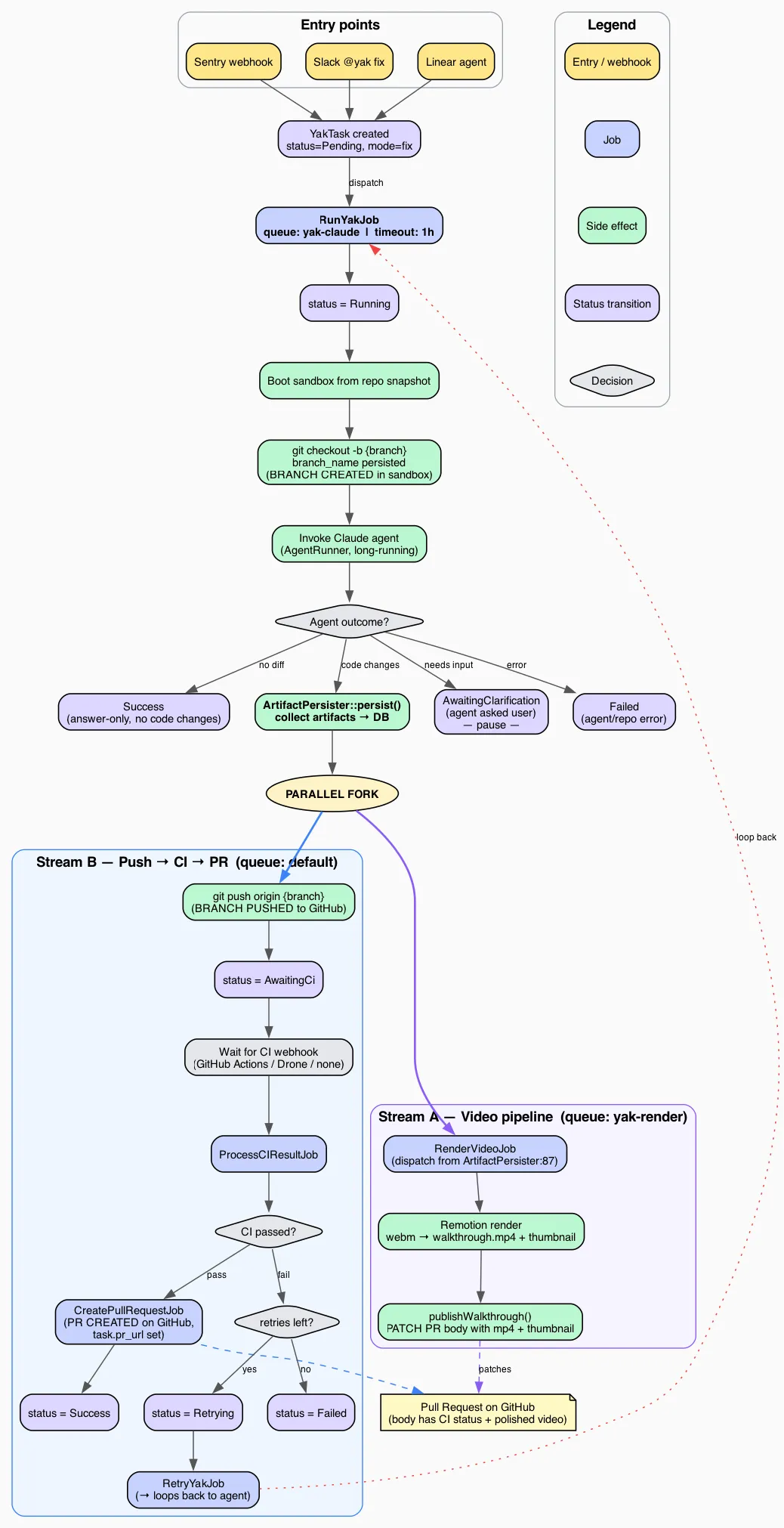
After the agent finishes, work splits into two parallel streams:
- Stream B (push → CI → PR) pushes the branch, waits for CI, and on green creates the PR.
- Stream A (video pipeline) captures and renders the walkthrough, then patches the PR body once the video is ready.
Both streams converge on the same PR — whichever finishes first writes its piece, the other fills in later. Tasks never block the queue while CI runs: the worker finishes a job, CI runs asynchronously, and a webhook triggers the next step.
The Walkthrough Video Pipeline (v3)
Section titled “The Walkthrough Video Pipeline (v3)”Instead of narrating over one continuous screen recording, the agent writes a script.json describing the walkthrough as a sequence of shots, captions and pauses. Two sandbox-side CLI steps turn that script into footage:
yak-browser scriptlintsscript.json— a headless dry run plus an asset preflight — before anything is captured, so a bad script fails fast instead of burning a shoot.yak-browser shootdrives a real browser through the script and writesshots/*.webm(per-beat clips),stills/*.png,screenshots/*.png, and amanifest.jsondescribing what was captured and in what order.
Back in the app, ArtifactPersister walks that output recursively, persists each file as an Artifact tagged with its role, and dispatches exactly one RenderWalkthroughJob per task — keyed on the task id, not on any single artifact, because one v3 render draws on many clips.
RenderWalkthroughJob runs scripts/timeline.ts to turn the manifest and script into a render timeline, writes chapters.json, renders the WalkthroughV3 Remotion composition into the final cut, and runs it through RenderQaCheck — a frame-sampling gate that catches blank or garbled output before it reaches a reviewer. Once the cut passes QA, the job derives the thumbnail and a preview GIF, writes MP4 chapter metadata, and replaces the <!-- yak:walkthrough --> section of the PR body.
Artifact roles form the vocabulary this pipeline is built on: script and manifest (the two shoot-time descriptors), shot, still, screenshot and voiceover (raw capture output), chapters (render-time metadata), and cut, thumbnail, preview (the finished, reviewer-facing output). raw is the legacy single-webm role.
The legacy single-webm path — one continuous walkthrough.webm recording, rendered by RenderVideoJob into the WalkthroughV2 composition under video/src/legacy/ — stays in place until no v2 artifacts remain in the system; yak:video:rerender and yak:video:prune both understand the two pipelines side by side.
The diagram source is fix-task-flow.dot (Graphviz). Regenerate with dot -Tpng docs/fix-task-flow.dot -o docs/fix-task-flow.png -Gdpi=150.
Two-Tier AI
Section titled “Two-Tier AI”Yak uses two distinct AI layers with different models, different frameworks, and different responsibilities.
| Layer | Framework | Models | Purpose |
|---|---|---|---|
| Routing & Analysis | Laravel AI (Anthropic API) | Haiku, Sonnet | Webhook processing, request routing, communication with users in Slack/Linear, Sentry triage, task intake |
| Implementation | Claude Code CLI (claude -p) | Opus | Code changes, testing, committing, PR creation, research, ambiguity assessment |
The Routing Layer
Section titled “The Routing Layer”The routing layer is lightweight — classify the request, detect the repo, format the prompt, post results back to the source. It runs on the Anthropic API via Laravel AI using your ANTHROPIC_API_KEY.
| Task | Model | Why |
|---|---|---|
| Parse Slack message / webhook | Haiku | Fast, cheap, structured extraction |
| Detect repo from message | Haiku | Pattern matching against known slugs; falls back to natural-language routing using repo descriptions when no explicit mention is found (RepoRoutingAgent) |
| Summarize Sentry stacktrace | Sonnet | Needs actual code comprehension |
| Assemble task context from Linear/Sentry | Sonnet | Judgment about what context matters |
| Format and post results back to source | Haiku | Templated output |
The Implementation Layer
Section titled “The Implementation Layer”Claude Code does the heavy lifting: reading files, assessing ambiguity with full codebase + MCP context, making changes, running tests, committing. It runs headlessly via claude -p with --dangerously-skip-permissions — no tool approval prompts, fully autonomous.
Claude Code is always Opus. Opus produces better first-attempt results, which means fewer retries and less total work than starting with Sonnet and escalating.
Implementation runs on a Claude Max subscription, not the API key. The subscription covers Claude Code usage; the API key covers the routing layer. These are separate auth mechanisms — see Setup → Log In To Claude Code for how each is configured.
Channel Driver Architecture
Section titled “Channel Driver Architecture”Channel drivers are task-workflow scoped. PR reviews and branch deployments both operate directly on the GitHub integration rather than going through the channel driver interfaces.
Every external integration is a pluggable channel. Channels are enabled by the presence of credentials — no credentials, no channel. The app detects which channels are active at boot and registers only those routes, webhooks, and MCP servers.
┌─────────────────────────────────────────────────────┐│ Channel Drivers ││ ││ Input Drivers (how tasks arrive): ││ ┌────────┐ ┌────────┐ ┌────────┐ ┌──────────────┐ ││ │ Slack │ │ Linear │ │ Sentry │ │ Manual CLI │ ││ │ opt. │ │ opt. │ │ opt. │ │ always avail │ ││ └────────┘ └────────┘ └────────┘ └──────────────┘ ││ ││ CI Drivers (how build results return): ││ ┌─────────────────┐ ┌────────┐ ││ │ GitHub Actions │ │ Drone │ (per-repo setting) ││ └─────────────────┘ └────────┘ ││ ││ Notification Drivers (where results are posted): ││ ┌────────┐ ┌────────┐ ┌────────┐ ││ │ Slack │ │ Linear │ │ GitHub │ (follows source) ││ │ opt. │ │ opt. │ │ PRs │ ││ └────────┘ └────────┘ └────────┘ │└─────────────────────────────────────────────────────┘The Three Driver Interfaces
Section titled “The Three Driver Interfaces”Each channel implements one or more of these contracts, defined in app/Contracts/:
InputDriver // Parse incoming webhook/event → normalized task descriptionCIDriver // Parse build result webhook → pass/fail with failure outputNotificationDriver // Post status updates and results to the sourceA single channel can fill multiple roles. GitHub is both a CI driver (via Actions) and a notification driver (via PR bodies). Slack is both an input driver and a notification driver.
Routing Back To The Source
Section titled “Routing Back To The Source”The rule is respond where you were asked. Every task has a source column identifying its origin. Notifications always route back to that source; if the source channel is disabled (for historical tasks after removing a channel), notifications fall back to a PR comment.
See the Channels page for the full list of channels and their roles.
Task State Machine
Section titled “Task State Machine”Task status is a fat enum (artisan-build/fat-enums) with transitions enforced at the model level. Setting $task->status = TaskStatus::AwaitingCi on a task that is currently Pending throws InvalidStateTransition — the enum enforces the rules, not the job code.
States
Section titled “States”pending → running → awaiting_ci → success (fix tasks)pending → running → success (research / setup tasks)With these branches:
running → awaiting_clarification → running(Slack fix tasks only, 3-day TTL)awaiting_ci → retrying → awaiting_ci(at most one retry, so at most two attempts)*→ failedat any point where Claude errors, budget is exceeded, or retries run out
Three terminal states: success, failed, expired.
Transition Diagram
Section titled “Transition Diagram” ┌─────────────────────────────────────────┐ │ Fix Task (primary path) │ │ │pending ──→ running ────┼──→ awaiting_ci ──→ success │ │ │ │ │ │ │ ├──→ retrying ──→ awaiting_ci │ │ │ │ │ │ │ │ └──→ failed ←────────┘ │ │ │ │ │ ├──→ awaiting_clarification ──→ running │ │ │ │ │ │ │ └──→ expired │ │ │ │ │ └──→ failed │ │ │ ├──→ success (research / setup — no CI) │ │ │ └──→ failed (error during any mode) │ └─────────────────────────────────────────┘Full Transition Table
Section titled “Full Transition Table”| From | To | Trigger |
|---|---|---|
Pending | Running | Job picked up by queue worker |
Running | AwaitingCi | Claude completed, branch pushed (mode = fix) |
Running | AwaitingClarification | Claude returned clarification JSON (source = slack) |
Running | Success | Research or setup task completed |
Running | Failed | Claude errored, budget exceeded, scope exceeded |
AwaitingClarification | Running | User replied in Slack thread, session resumed |
AwaitingClarification | Expired | clarification_expires_at passed (3-day TTL) |
AwaitingCi | Success | CI green, PR created |
AwaitingCi | Retrying | CI red, attempts - attempts_at_manual_retry < max_attempts |
AwaitingCi | Failed | CI red, retry budget used up |
Retrying | AwaitingCi | Retry completed, branch force-pushed |
Retrying | Failed | Claude errored on retry |
Failed | Retrying | Dashboard Retry on a task CI already reported on; continues on the existing branch |
Failed | Pending | Dashboard Retry on any other failed task; starts over |
Sandbox Isolation (Incus)
Section titled “Sandbox Isolation (Incus)”Every Claude Code task runs in an isolated Incus system container. Each container has its own Docker daemon, network namespace, and filesystem — cloned from a ZFS copy-on-write snapshot in under 3 seconds.
Host (Hetzner Dedicated Server)│├─ Yak App (Docker container)│ ├─ Web (nginx + php-fpm)│ ├─ Queue workers (4x yak-claude, 3x default)│ └─ Scheduler│├─ MariaDB (Docker container, yak-internal network)│├─ Incus (system container manager, ZFS-backed)│ ├─ yak-tpl-{repo}/ready ← snapshot per repo (setup result)│ ││ ├─ task-42 ← clone of snapshot (CoW, isolated)│ │ └─ Docker daemon, compose services, Claude Code│ ││ └─ task-43 ← another clone (fully independent)│ └─ Docker daemon, compose services, Claude CodeWhy Incus
Section titled “Why Incus”Three guarantees make sandboxed execution safe at scale:
- Network isolation — sandbox containers are on a separate bridge (
yak-sandbox) with firewall rules blocking access to the yak app and MariaDB. The agent cannot reach the yak database, period. - Port isolation — each container has its own network namespace. Port 8000 in container A doesn’t conflict with port 8000 in container B.
- Filesystem isolation — ZFS copy-on-write means each container has its own writable filesystem. Changes in one container are invisible to others, so concurrent tasks on the same repo never collide.
The Snapshot Workflow
Section titled “The Snapshot Workflow”- Setup —
SetupYakJobcreates a sandbox from the base template (yak-base), clones the repo, runs Claude’s setup (npm install, composer install, docker-compose up, etc.), then snapshots the result asyak-tpl-{repo}/ready. - Task execution —
RunYakJobclones from the repo snapshot (instant, ~2s). The agent works in a pristine copy of the fully-prepared environment. - Cleanup — after the task completes (success or failure), the sandbox is destroyed. ZFS reclaims the space immediately.
Docker-in-Incus
Section titled “Docker-in-Incus”Repo dev environments using Docker Compose work natively inside Incus containers. security.nesting=true gives each container its own Docker daemon. There’s no shared Docker socket, no port override files, no DinD hacks.
Private registry auth follows the same push-then-start pattern as Claude config and MCP config: Ansible renders ~/.docker/config.json on the host from the docker_registries vault var, the Yak container bind-mounts it read-only, and IncusSandboxManager pushes the file into each fresh sandbox at /home/yak/.docker/config.json before docker pull ever runs. Repos that only need public images leave the vault var unset and the push is skipped entirely.
Jobs and Queues
Section titled “Jobs and Queues”Two queues separate Claude Code work from everything else:
| Queue | Concurrency | Timeout | Jobs |
|---|---|---|---|
yak-claude | 4 | 600s | RunYakJob, RetryYakJob, ResearchYakJob, SetupYakJob, ClarificationReplyJob |
default | 3 | 30s | ProcessCIResultJob, webhook handlers, PR creation, notifications, cleanup |
The split exists to prevent a common failure mode: Task A’s CI passes, but Task A’s PR creation blocks for 10 minutes because Task B is mid-Opus on yak-claude. Putting coordination work (webhook processing, PR creation) on the default queue keeps it responsive even when Claude Code is busy.
Concurrent Execution
Section titled “Concurrent Execution”With Incus sandbox isolation, Claude Code tasks run concurrently (4 workers by default). Each task gets its own isolated container — no shared ports, no shared filesystem, no shared Docker daemon. Throughput scales with available RAM (each sandbox uses ~4-8GB).
The Main Jobs
Section titled “The Main Jobs”RunYakJob— the initial Claude Code session. Yak creates the branch (yak/{external_id}), then invokes Claude Code which writes code and commits locally. After Claude finishes, Yak pushes the branch and transitions the task toawaiting_ci. Claude Code never pushes or creates PRs — the system prompt explicitly forbids remote git operations.ClarificationReplyJob— runs when a user replies to a Slack clarification. Resumes the original Claude session with--resume $session_idand the user’s chosen option. Claude already has full codebase context from the assessment phase — no ramp-up.ProcessCIResultJob— runs when a CI webhook arrives. On green, it collects artifacts and Yak creates the PR via the GitHub App API, then notifies the source. On red, it either dispatchesRetryYakJob(first failure) or marks the task failed (second failure). For GitHub Actions, a failed workflow run first gets one re-run of its failed jobs, and only a second failure on the same commit reaches this job.RetryYakJob— resumes the original Claude session with CI failure output and runs a second attempt on the existing branch. Yak force-pushes the result.ResearchYakJob— for research mode tasks. Read-only; no branch, no CI. Claude generates a standalone HTML findings page saved to.yak-artifacts/research.html.SetupYakJob— the one-time dev environment setup task for a new repo. See Repositories → The Setup Task.RunYakReviewJob— the PR review path. Runs Claude in the sandbox with a read-only prompt scoped to a PR’s diff, then posts the parsed findings as a GitHub review via the installation token. See PR Review.PollPullRequestReactionsJob— scheduled hourly. Polls GitHub for 👍/👎 reactions on Yak-authored review comments within a configurable window and denormalizes counts ontopr_review_comments.RenderWalkthroughJob— the v3 video render, keyed on the task id. Loads a task’sscript,manifest,shotandvoiceoverartifacts, builds the render timeline, rendersWalkthroughV3, gates it throughRenderQaCheck, and patches the PR body. See The Walkthrough Video Pipeline (v3).RenderVideoJob— the legacy v2 render, keyed on the rawwalkthrough.webmartifact. Renders theWalkthroughV2composition. Stays in place until no v2 artifacts remain.
Middleware
Section titled “Middleware”EnsureDailyBudget— checks thedaily_coststable before Claude Code invocations. If today’s routing-layer cost exceedsdaily_budget_usd, the job fails gracefully. This prevents runaway alert storms from blowing the budget.
Session Continuity
Section titled “Session Continuity”When a retry or clarification reply is needed, Yak uses claude -p --resume $session_id to continue the original Claude session. Claude retains its full context — files it read during assessment, approaches it considered, what it already tried.
This is the single biggest cost optimization in Yak. A fresh session starting from zero would re-read the codebase, re-check Sentry, re-analyze the stacktrace. Resuming skips all of that and jumps directly to the new prompt (the CI failure, or the user’s chosen clarification option).
session_id is stored on the task row and used for:
- Retries after a first CI failure
- Clarification replies when a Slack user picks an option
- Post-hoc debugging — you can resume a completed task’s session manually if needed
The Data Model
Section titled “The Data Model”Five tables, deliberately minimal. MariaDB is the backing store, running as a separate Docker container with its own persistent volume.
The primary record. Every incoming event creates a task row. Key columns:
| Column | Purpose |
|---|---|
source | sentry, flaky-test, linear, slack, manual |
repo | Slug joining to repositories.slug |
external_id | Source-side ID (GEO-1234, SENTRY-98765). Unique with repo. |
mode | fix, research, setup |
status | Fat enum: pending, running, awaiting_clarification, awaiting_ci, retrying, success, failed, expired |
branch_name | yak/{external_id} once created |
session_id | Claude session ID for --resume |
clarification_options | JSON array of option strings (Slack only) |
pr_url, pr_merged_at, pr_closed_at | Outcome tracking |
cost_usd, duration_ms, num_turns | Metrics |
UNIQUE(external_id, repo) enforces deduplication — re-opening the same Sentry issue won’t create a second task.
task_logs
Section titled “task_logs”Append-only event log that powers the task detail page’s timeline. Each row is level (info/warning/error) + message + optional JSON metadata. Events are written at key lifecycle points: task created, picked up, assessment complete, fix pushed, CI result, PR created, task completed.
artifacts
Section titled “artifacts”Rows reference screenshots, videos, and research HTML pages stored on disk. Served at /artifacts/{task}/{filename} via signed URL (for PR embedding) or authenticated request (for dashboard viewing). Each row carries a role — cut, thumbnail, preview, chapters, shot, still, screenshot, voiceover, manifest, script, raw — that both render pipelines and the yak:video:rerender / yak:video:prune commands query against instead of type or filename.
repositories
Section titled “repositories”One row per configured repo. Minimal schema — slug, name, path, default branch, CI system, Sentry mapping, setup status, notes. Everything else is auto-detected at task time from README.md and CLAUDE.md.
daily_costs
Section titled “daily_costs”Primary key is date. Tracks routing-layer API costs for budget enforcement. Updated after each task completes. Read by the EnsureDailyBudget middleware before any Claude Code invocation.
branch_deployments
Section titled “branch_deployments”One row per open PR on an opted-in repository. Key columns:
| Column | Purpose |
|---|---|
status | State machine: pending, provisioning, running, hibernated, failed, destroyed |
template_version | Pinned to the current_template_version of the repo at creation time. The deployment clones from that snapshot version for its whole lifetime. |
last_accessed_at | Updated on every inbound request. Used as the idle signal for hibernation (15 minutes) and eviction ordering. |
public_share_token_hash | SHA-256 hash of the raw share token. Raw token is shown once at mint time and never persisted. Null when no share link is active. |
PR Review Workflow
Section titled “PR Review Workflow”Yak reviews pull requests in a dedicated workflow that runs alongside the coding agent. The review agent runs in a sandbox fork of the same per-repo template, reads the PR diff, and leaves line-level comments (suggestion blocks where the fix is obvious, prose when it needs explanation).
The review workflow reuses the substrate: same GitHub App, same sandbox infrastructure, same dashboard surface. It has its own state machine separate from the task state machine. Reviewer output is surfaced as native GitHub PR review comments.
For the full flow, see docs/pr-review.md.
Branch Deployments Workflow
Section titled “Branch Deployments Workflow”Every open PR on an opted-in repo gets a live preview URL at <repo>-<branch>.<hostname>, wired up automatically from the pull_request.opened webhook. Previews are:
- OAuth-gated by default, with optional time-boxed public-share tokens for external reviewers
- Hibernated when idle after 15 minutes, resumed on the next request (first-hit latency 5 to 15 seconds)
- Destroyed when the PR closes, merges, or is deleted, or after 30 days of inactivity
Each preview runs in its own Incus container cloned from the same per-repo template snapshot that powers task sandboxes. A reverse proxy (Caddy in the default install) handles wildcard TLS, OAuth enforcement via forward-auth, and upstream resolution per request.
Preview state is mirrored to GitHub’s native Deployments API, so the PR UI shows a “View deployment” button automatically.
For the end-to-end user guide, see docs/branch-deployments.md.
Safety Model
Section titled “Safety Model”The safety guarantees are deliberate design choices, not afterthoughts.
--dangerously-skip-permissions Is Always On
Section titled “--dangerously-skip-permissions Is Always On”Claude Code runs with --dangerously-skip-permissions on every invocation. No tool approval prompts, no human in the loop during execution. This is the only way unattended operation works at scale.
The safety boundary is the sandbox, not permission dialogs:
- Dedicated server. Completely separate from production. No VPN, no Tailscale, no shared network.
- No production access. No production databases, no customer data, no deployment pipelines.
- Incus sandbox isolation. Each task runs in its own Incus system container with:
- Own Docker daemon — no access to the host’s Docker socket.
- Own network namespace — firewall rules block access to the yak app and MariaDB.
- Own filesystem — ZFS copy-on-write from a snapshot. Changes are invisible to other tasks.
- Own process tree — no visibility into host processes.
- Short-lived credentials. GitHub App tokens are injected per-task and are short-lived. Claude Max auth tokens are copied read-only from the host.
- Automatic cleanup. Sandbox containers are destroyed after each task. A cron job catches any that were missed.
Claude can do anything it wants inside that sandbox. The walls are real — Incus namespace isolation, not just user separation within a shared container.
No Merge Authority
Section titled “No Merge Authority”Yak creates PRs. Humans merge them. Always. The GitHub App must NOT be in your branch protection bypass list. Repository owners may opt into risk-based review approval (see PR Review); this grants no merge authority.
This is non-negotiable by design. If you want to automate merging, don’t use Yak.
Bounded Retries
Section titled “Bounded Retries”At most two attempts per task. Retries use Opus (same model as the initial attempt). If two attempts both fail, the task is marked failed and a human takes over.
Independent CI Verification
Section titled “Independent CI Verification”The full test suite runs on real CI, not on self-reported output from Claude. Claude runs relevant tests locally to catch obvious issues before pushing, but the authoritative check is CI.
Cost Controls
Section titled “Cost Controls”Three layers:
- Per-task budget —
--max-budget-usd 5.00on every Claude CLI invocation, as a runaway guardrail. Implementation cost is covered by the subscription; this limit exists for safety. - Daily budget —
daily_budget_usd(default $50) covers routing-layer API costs. Enforced by theEnsureDailyBudgetmiddleware before any Claude Code job starts. - Deduplication —
UNIQUE(external_id, repo)prevents repeat work on the same issue.
Scope Flag
Section titled “Scope Flag”PRs larger than large_change_threshold (default 200 LOC) get the yak-large-change label. Reviewers can use this to route reviews to more senior eyes or reject outright.
Dashboard Auth
Section titled “Dashboard Auth”Google OAuth with a required domain allowlist (GOOGLE_OAUTH_ALLOWED_DOMAINS). There is no public dashboard. There are no roles — every team member behind the allowlist sees everything, including debug logs and session IDs, but nothing is reachable without signing in.
Artifacts embedded in GitHub PRs (screenshots, videos) use HMAC-SHA256 signed URLs with a 7-day expiry. After expiry, artifacts are still accessible through the authenticated dashboard.
What Yak Is Not
Section titled “What Yak Is Not”- Not a merge bot. See above — no merge authority, no bypass.
- Not horizontally scaled. Four concurrent workers on one server. The architecture supports future scaling to multiple hosts but doesn’t need it.
- Not a long-running interactive agent. Each task is a focused, mostly autonomous pass. You can give feedback on an open PR — in the originating channel, as a
/yakPR comment, or from the dashboard — and Yak resumes the session and pushes follow-up commits to the same branch. But it’s not a chat session for open-ended discussion or large multi-step features. - Not a frontend framework. Dashboard is Livewire (server-rendered) with Livewire polling for live updates. No SPA, no websockets.
- Not Kubernetes-anything. Two Docker containers (app + MariaDB) + Incus for sandboxed task execution on a dedicated server. Laravel’s database queue driver. Boring stack.
- Not a production deploy platform. Previews are preview environments only. Merging a PR does not deploy it anywhere; the existing production deploy pipeline remains the source of truth.